Best Wired Headphones for Video Calls by Mic and Fit

A plug-and-play USB headset, a budget on-ear pick, and a gaming set with a detachable boom mic. Here is how six wired options compare for meetings and calls.

By Sam BaileyUpdated 15 min read
On this page
- Best wired headphones for video calls at a glance
- How I narrowed six listings to a ranking
- 1. Logitech H390 Wired Headset PC/Laptop Stereo Headphones — Best overall
- 2. AOC USB Headset with Microphone for PC — Best upgrade
- 3. JBL Quantum 100 - Wired Over-Ear Gaming Headphones — Best minimal setup
- 4. Sony ZX Series Wired On-Ear Headphones — Best budget pick
- 5. KVIDIO Wired Headphones with Mic — Best for pros
- 6. OneOdio Wired DJ Hi-Res Over-Ear Headphones for PC — Best premium
- Does a boom mic beat an in-line mic?
- USB or 3.5mm: which plug should you buy?
- What the listings leave out about call quality
- When a different pick wins
- The verdict
- FAQ
The best wired headphones for video calls are the Logitech H390, a 7.04 oz USB-A headset with a rotating noise-canceling boom mic and a 2-year limited warranty. If your machine has no free USB port and only a 3.5mm jack, the JBL Quantum 100 with its detachable boom mic is the better buy. Here is the misconception worth clearing up first: buyers shop these on driver size and bass, but the plug and the microphone type decide how you sound on a call.
Best wired headphones for video calls at a glance
| Pick | Mic type | Connection | Price |
|---|---|---|---|
Best overall Logitech H390 |
Rotating boom, noise-canceling claim | USB-A | Check Price |
Best upgrade AOC USB Headset |
Lift-to-mute, noise-canceling claim | USB-A | Check Price |
Best minimal setup JBL Quantum 100 |
Detachable boom, echo-cancel claim | 3.5mm | Check Price |
Best budget pick Sony ZX MDR-ZX110 |
None listed | 3.5mm | Check Price |
Best for pros KVIDIO Wired Headphones |
Built-in HD mic claim | 3.5mm | Check Price |
Best premium OneOdio Pro-10 |
None listed | 3.5mm | Check Price |



A quick note on the qualifier. Only three of these six list a microphone built for calls: the Logitech, the AOC and the JBL. The other three are music headphones that happen to be wired. That gap is the whole story, and it shapes every pick below.
How I narrowed six listings to a ranking
I built the ranking around buyer profiles, then checked each listing's published specifications against the job. Three profiles emerged from the data: the all-day meeting worker, the occasional caller who mostly listens, and the person plugging into a phone or console instead of a computer. Each profile wants a different plug and a different microphone.
The criteria, in order of weight:
- Microphone built for calls. A boom or dedicated call mic sits close to your mouth. Three picks have one on the listing; three do not.
- Connection that matches a call setup. USB-A brings its own audio processing. A 3.5mm plug relies on whatever jack your device offers.
- Comfort for long sessions. Weight and cushion type, taken from the specs where given.
- Published warranty, as a proxy for how long the maker stands behind it.
What that screening exposed: two picks carry no microphone claim at all, so they only reach a call through a separate mic or a phone's own input. They still earned spots because they win on price and comfort for people who mostly listen. The best wired headphones for video calls are not always the ones with the flashiest audio claim. They are the ones whose plug and mic match how you actually take a meeting.
1. Logitech H390 Wired Headset PC/Laptop Stereo Headphones — Best overall
The H390 is the pick to beat because it pairs a rotating boom mic with plug-and-play USB-A and the longest published warranty in this set.
Best for: home-office workers who live in Teams and Zoom Skip it if: your computer only has a 3.5mm jack
What sets the H390 apart in this group is the combination, not any single spec. It is a purpose-built computer headset with a rotating boom that Logitech says cancels background noise. The USB-A connector is plug-and-play, so there is no software to install and no separate sound card to fret over. The listing puts weight at 7.04 oz, with swivel-mounted leatherette cushions on an adjustable headband. Dimensions run 10.2 x 3.23 x 8.35 in.
Two details push it to the top. First, the boom arm tucks up out of the way when you are done, so the headset doubles as music cans between meetings. Second, in-line controls on the cable handle volume and mute without reaching for the screen. The warranty is 2 years limited, matching the longest here and beating the 6-month and 1-year listings.
The trade-off: it commits you to USB-A. If your only free port is USB-C, you need an adapter, and if you want to plug into a phone or a console, this is the wrong tool. It also sits third from cheapest in this set, so it is not the value play.
Pros:
- Rotating boom mic with noise-canceling claim
- Plug-and-play USB-A, no software
- 2-year limited warranty, longest here
- In-line volume and mute controls
- Boom tucks away for music use
Cons:
- USB-A only, no analog option
- Heavier than most picks at 7.04 oz
- Not the cheapest for the mid tier
- No detachable cable
2. AOC USB Headset with Microphone for PC — Best upgrade
The AOC is the lightest call-ready headset here at 3.04 oz, with a built-in sound card and a lift-to-mute mic.

Best for: people who want a light USB headset with a lift-to-mute mic Skip it if: you want a long published warranty
The AOC's edge is weight. At 3.04 oz it is less than half the mass of the Logitech, which matters over a back-to-back meeting day. AOC lists a built-in audio sound card, meaning the headset handles conversion rather than leaning on your laptop's jack. That is the same USB advantage the Logitech offers, in a lighter frame.
The controls are clever. You adjust volume by rotating the right ear cup, and you mute by lifting the mic 90 degrees, so a glance at the boom tells you whether you are live. AOC names Teams, Skype, Zoom and Webex as compatible, which is a software claim rather than a measured fact, but it signals the intended use. Connection is USB-A, one size fits all.
Where it slips behind the Logitech is confidence over time. The warranty reads as 1, and the listing carries fewer hard numbers, no dimensions and no headband detail. It sits in the mid price range, above the Logitech's position. You are paying a little more for less published spec, which is why it lands as the upgrade pick rather than the outright winner.
Pros:
- Lightest here at 3.04 oz
- Built-in sound card for USB calls
- Lift-to-mute mic, visible status
- Volume by rotating the ear cup
Cons:
- Short stated warranty
- No published dimensions or headband spec
- Priced above the Logitech
- USB-A only, no analog fallback
3. JBL Quantum 100 - Wired Over-Ear Gaming Headphones — Best minimal setup
The Quantum 100 is the only pick with a detachable boom mic on a 3.5mm plug, so it fits calls, consoles and phones alike.

Best for: gamers who also take a few calls a week Skip it if: you need a headset that plugs into USB
This is the flexible one. The Quantum 100 uses a 3.5mm connection, and JBL says it works with PC, Mac, Xbox, PlayStation, Nintendo Switch, mobile and VR. That single analog plug is why it earns the minimal-setup label: no drivers, no dongles, no USB port required. Plug it into a phone and the boom still reaches your mouth.
The microphone is detachable, which the two other call-ready picks are not. JBL claims echo-cancelling on the boom. Take the mic off and it becomes an ordinary pair of over-ear headphones with memory foam cushions in PU leather. Listed weight is 7.8 oz, the heaviest in this set, with dimensions of 9.06 x 9.65 x 3.54 in and a 2-year warranty that matches the top pick.
The catch is the plug itself. A 3.5mm mic depends on your device having a combined headset jack, and many desktops split mic and headphone into two sockets. On those you need a splitter. It is also positioned in the premium price range here, so you pay for the gaming pedigree even if you never fire up a game.
Pros:
- Detachable boom mic, echo-cancel claim
- 3.5mm works across PC, console, phone
- Memory foam cushions in PU leather
- 2-year warranty, longest here
Cons:
- Heaviest pick at 7.8 oz
- 3.5mm may need a splitter on desktops
- Premium price for a call use case
- No USB or in-line audio processing
4. Sony ZX Series Wired On-Ear Headphones — Best budget pick
The Sony ZX is the cheapest pick here and the lightest music headphone, but it carries no listed microphone.

Best for: listeners who only need occasional call use Skip it if: a boom microphone is a must
The ZX MDR-ZX110 is the value anchor of this group and the cheapest of the six. At 4.76 oz it is light and compact, with a swiveling earcup design for storage and a closed-back seal. Sony lists 1.38 in neodymium drivers and a frequency range of 12 Hz to 22 kHz, plus an L-shaped 3.5mm plug on a 3.94 ft cord and a 24 ohm impedance.
Be clear about the job it does. There is no microphone on this listing, so it is a listen-first headphone. For a video call it relies on your laptop's built-in mic or a separate one, which means your voice quality has nothing to do with the headphones. That is fine if your colleagues mostly need to hear you clearly through a decent laptop array, and you want good sound in your own ears without spending much.
Against the call-ready picks, that missing mic is the whole gap. The warranty is 1 year, shorter than the JBL and Logitech. If your calls are rare and your listening is frequent, the low price and 4.76 oz weight make it a sensible default.
Pros:
- Cheapest of the six
- Light at 4.76 oz
- 12 Hz to 22 kHz stated range
- L-shaped 3.5mm plug, 3.94 ft cord
Cons:
- No microphone listed
- Relies on device mic for calls
- On-ear fit seals less than over-ear
- 1-year warranty
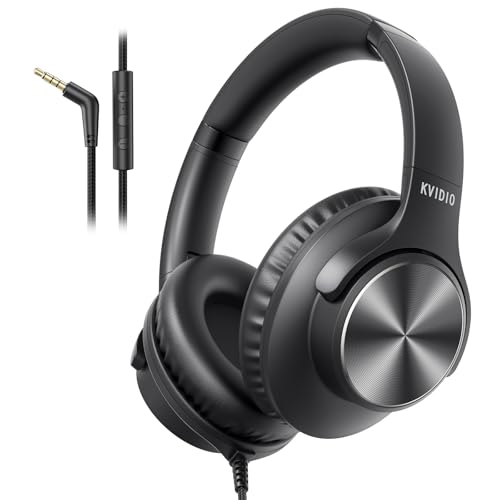
5. KVIDIO Wired Headphones with Mic — Best for pros
The KVIDIO is the second-cheapest pick and folds flat, with a built-in HD mic claim but the shortest warranty here.
Best for: students and casual callers on a tight budget Skip it if: you plug into a desktop and need in-line volume
KVIDIO's pitch is a full-size over-ear headphone with a microphone at an entry price, second-cheapest in this set. The listing names 40mm drivers and a built-in HD mic for voice pickup on calls and podcasts. It folds compactly and rotates for travel, with a 5-level adjustable headband to fit a range of head sizes. Connection is 3.5mm.
Two things keep it below the call-ready leaders. First, the mic is inline rather than on a boom, so it sits farther from your mouth than the Logitech or JBL arm. Second, and this comes straight from the listing, the in-line volume button is not supported on desktops and some laptops, so you would set volume on the device itself. On a phone or a laptop with a combined jack it behaves better.
For a student jumping between class calls and music, the fold-flat build and low price do real work. It lists no weight or dimensions and a 6-month warranty, the shortest of the six, so it trades long-term coverage for upfront savings. Treat it as a light-duty caller, not an all-day meeting rig.
Pros:
- Second-cheapest pick here
- 40mm drivers with built-in mic claim
- Folds flat for travel
- 5-level adjustable headband
Cons:
- In-line volume unsupported on many desktops
- 6-month warranty, shortest here
- No listed weight or dimensions
- Inline mic sits farther from mouth than a boom
6. OneOdio Wired DJ Hi-Res Over-Ear Headphones for PC — Best premium
The OneOdio Pro-10 has the biggest listed drivers at 50mm, but it is a monitoring headphone with no call mic and the highest price here.

Best for: monitoring audio while you occasionally hop on a call Skip it if: you want a dedicated call microphone
The Pro-10 is the audio enthusiast's entry, and it is the most expensive pick here. OneOdio lists 50mm drivers with neodymium magnets, the largest in this group, aimed at bass and studio monitoring. The ear cups swivel 90 degrees for single-ear monitoring, a feature borrowed straight from DJ use, and there is a share-audio port so a second pair can plug in without a splitter. Listed weight is 0.66 lb with a 2-year warranty.
For calls, though, this is a listen-first tool like the Sony. There is no microphone on the listing, so your voice reaches a call through your device's own input. The design leans toward mixing and monitoring, where a mic is beside the point. If your priority is hearing rich audio clearly and you only take the occasional call, the large drivers and swivel cups are the draw.
The problem for this roundup is direct. You pay the top price and get no call microphone, while the Logitech and JBL cost less and put a mic near your mouth. It sells faster than most of this set, which tells you it appeals for its audio, not its calls. Buy it for sound first.
Pros:
- Largest listed drivers at 50mm
- 90-degree swiveling ear cups
- Share-audio port, no splitter
- 2-year warranty
Cons:
- No microphone listed for calls
- Most expensive pick here
- Heavier build at 0.66 lb
- Aimed at monitoring, not meetings
Does a boom mic beat an in-line mic?
For calls, a boom mic beats an in-line mic in one measurable way: distance. A boom arm places the capsule near your mouth, while an in-line mic clips somewhere on the cable, farther off and closer to clothing rustle. That is why the boom picks lead this ranking.
Here is how the three call-ready designs differ:
- Rotating boom (Logitech H390): stays near the mouth, tucks away when idle, noise-canceling claim.
- Detachable boom (JBL Quantum 100): removable so the headset doubles as plain cans, echo-cancel claim.
- Lift-to-mute boom (AOC): flips up 90 degrees to mute, so you can see your status.
An in-line mic, like the KVIDIO's, still works for a call. It just asks more of the software's noise handling. If people ask you to repeat yourself on calls, a boom is the fix.
USB or 3.5mm: which plug should you buy?
USB or 3.5mm is the choice that quietly decides your call setup. A USB headset carries its own audio processing, so the Logitech and AOC bypass whatever cheap jack your laptop shipped with. A 3.5mm plug leans on the device's built-in audio, which varies a lot.
Match the plug to your gear:
- Laptop with a spare USB-A port: the Logitech H390 or AOC. Plug and talk.
- Phone, tablet or game console: the JBL Quantum 100 on 3.5mm, or any analog pick.
- Desktop with split mic and headphone jacks: check for a combined port first, or plan on a splitter for a 3.5mm headset.
One trap the listings hint at: the KVIDIO notes its in-line volume does not work on desktops. Analog controls behave unpredictably on full computers, so USB is the safer bet for a fixed workstation.
What the listings leave out about call quality
The listings are generous with drivers and cushions and quiet about the things that actually decide a call. Read around the gaps.
- Mic pickup pattern. "Noise-canceling" and "echo-cancel" are the makers' words, not measured figures. None of these listings publish a frequency response or sensitivity for the mic.
- Cable length. Only the Sony states a cord length, 3.94 ft. The rest leave it out, which matters if you sit far from a desktop tower.
- Software compatibility. AOC names Teams, Skype, Zoom and Webex, but that is a marketing note, not a certification.
- Latency. No listing here quotes it, and for wired headsets it is usually a non-issue.
The honest read: for the best wired headphones for video calls, judge the mic type and plug from the specs, and treat every "clear voice" phrase as a claim to verify on your own first call.
When a different pick wins
The winner is not universal. Three concrete conditions flip it.
- You only have a 3.5mm jack. The Logitech's USB-A is useless here. Go JBL Quantum 100 for its detachable boom on an analog plug.
- You barely take calls and mostly listen. Skip the call-ready picks. The Sony ZX at 4.76 oz is the cheapest, lightest listen-first option, and the OneOdio Pro-10 offers 50mm drivers if audio quality leads.
- You want the lightest all-day headset and don't mind a short warranty. The AOC at 3.04 oz wins on comfort, less than half the Logitech's mass.
For students bouncing between class and music on a budget, the foldable KVIDIO covers both jobs at the second-lowest price. Pick the condition that matches your day.
The verdict
The best wired headphones for video calls are the Logitech H390. It is the pick that gets the two things right that decide a call: a rotating boom mic that sits near your mouth, and plug-and-play USB-A that handles audio without leaning on a laptop's weak jack. Add the 2-year limited warranty, the longest here, and it is the safe default for anyone who lives in meetings.
Two conditions flip that call. First, if your machine has no free USB port and only a 3.5mm jack, the JBL Quantum 100 wins. Its detachable boom mic works across PC, console and phone on a single analog plug, and it shares the same 2-year warranty. Second, if you mostly listen and rarely talk, drop to the Sony ZX MDR-ZX110. At 4.76 oz and the lowest price here, it is a light, sealed listen-first headphone that leans on your device mic for the occasional call.
The AOC runs the Logitech closest, undercutting it on weight at 3.04 oz with the same USB advantage. What holds it back is a shorter stated warranty and a thinner spec sheet. Start with the Logitech, and step sideways only when your plug or your call frequency says otherwise.
FAQ
Are wired headphones for video calls worth it over Bluetooth?
Wired headphones for video calls are worth it if you value a stable connection and zero pairing fuss. A USB or 3.5mm plug means no battery to die mid-meeting and no dropout. The Logitech H390 is plug-and-play over USB-A, so you skip drivers entirely. The trade is a tether to your desk, which most home-office workers accept happily.
Is the Logitech H390 worth it for daily meetings?
The Logitech H390 is worth it for daily meetings because it pairs a rotating boom mic with USB-A audio processing and a 2-year limited warranty, the longest in this set. It weighs 7.04 oz with leatherette cushions on an adjustable headband, and the boom tucks away for music. The main limit is the plug: it needs a free USB-A port, not a 3.5mm jack.
What connection do these headphones use for calls?
The connection these headphones use splits two ways. The Logitech H390 and AOC use USB-A, which brings its own sound handling. The JBL Quantum 100, Sony ZX, KVIDIO and OneOdio Pro-10 use a 3.5mm plug that relies on your device's audio. Match USB to a laptop with a spare port, and 3.5mm to a phone or console.
Logitech H390 or JBL Quantum 100 for video calls?
Choose the Logitech H390 or JBL Quantum 100 by your plug. The H390 uses USB-A with a rotating boom mic and built-in audio processing, best on a laptop with a free port. The Quantum 100 uses 3.5mm with a detachable boom, best across phone, console and PC. Both carry a 2-year warranty. The JBL is heavier at 7.8 oz.
What is the biggest mistake buying call headphones?
The biggest mistake buying call headphones is shopping on driver size instead of the microphone. Big 50mm drivers, like the OneOdio Pro-10's, make music sound great but do nothing for your voice, and that model lists no call mic at all. Check for a boom or dedicated mic first, then confirm the plug matches your device.
If you take calls every day on a laptop, start with the Logitech H390 and adapt only if your ports say otherwise. The reason it stays the default is simple: it puts a noise-canceling boom near your mouth, processes audio over USB-A instead of a weak jack, and backs it with a 2-year warranty. Grab a JBL Quantum 100 if you jump between a phone and a console, or a Sony ZX if calls are rare and listening comes first. Check the port on your own machine before you decide, then buy the plug that fits it.