Best TV for Video Calls: Meta Portal TV Leads
A ranked look at the best TV for video calls, from the whole-room Meta Portal TV to a JubileeTV senior-care hub and budget screen-mirroring dongles under an ounce and a half.

By Sam BaileyUpdated 15 min read
On this page
- Why 'video call' means two very different products here
- Best TV for video calls at a glance
- How I ranked these six
- 1. Meta Portal TV - Big Screen Smart Video Calling — Best overall
- 2. Caavo JubileeTV Remote Care System for Seniors — Best premium
- 3. RayBit 4K Pro Audio and Video Conference Room Camera — Best for families
- 4. Meta Quest Portal TV from Facebook — Most versatile
- 5. X88 Screencast TV Stick 4K Ultra HD Streaming Stick — Best upgrade
- 6. Tsemy Wireless Screen Mirroring Adapter — Best budget pick
- Which pick fits your living room?
- What the listings do not tell you
- Setup: what owning one actually involves
- The verdict
- FAQ
The best TV for video calls is the Meta Portal TV, a 0.68 lb device that sits on your set and captures the whole room so a group call never becomes a game of musical chairs. If you're buying for an older parent instead, the Caavo JubileeTV wins, because it auto-answers and lets you drive their TV from your own phone. Neither of these is a television.
That last line matters, so read the next section before you buy anything.
Why 'video call' means two very different products here
Search for the best TV for video calls and Amazon hands you a pile of gear that is not a television at all. That's the trap. None of the six picks here is a screen you watch shows on. They are devices that add calling to a TV you already own.
Two families of product turned up:
- Purpose-built calling hubs. The Meta Portal TV, its UK-import sibling, and the Caavo JubileeTV each carry their own camera, microphone and calling software. You plug them into your set and call people.
- Mirroring and camera accessories. The X88 and Tsemy dongles cast your phone's screen to the TV. The RayBit is a conference camera for a computer. They can carry a call, but the call runs on another device.
So the honest answer to "which TV is best for video calls" is: none, because the thing you actually want is a calling device that uses your TV as the screen. The deciding question is whether you want the TV to run the call itself, or just to display a call running on your phone. Pick wrong and you'll buy a dongle expecting a built-in camera that isn't there.
Best TV for video calls at a glance
| Pick | Type | Own camera? | Price |
|---|---|---|---|
Best overall Meta Portal TV |
Calling hub, 0.68 lb | Yes, smart pan/zoom claim | Check Price |
Best premium Caavo JubileeTV |
Senior-care hub | Yes, auto-answer claim | Check Price |
Best for families RayBit 4K Pro |
Conference camera, 0.99 lb | Yes, for a PC | Check Price |
Most versatile Portal TV (Alexa) |
Calling hub, 1.74 lb | Yes, smart pan/zoom claim | Check Price |
Best upgrade X88 Screencast Stick |
Mirroring dongle, 16GB | No, mirrors phone | Check Price |
Best budget pick Tsemy Mirroring Adapter |
Mirroring dongle, 1.16 oz | No, mirrors phone | Check Price |



How I ranked these six
I never plugged any of these in. What I did was line up every published specification side by side and sort the six into the two families above, then rank each device on how directly it does the one job the search implies: getting a video call onto a television.
Three things got a pick marked down.
- The call doesn't run on the device itself. The X88 and Tsemy dongles need a phone or laptop to carry the call. That's a real limitation, so both land near the bottom.
- The device isn't aimed at a TV at all. The RayBit is a conference camera for a desktop or laptop, per its listing. It works beautifully in a meeting room, but it's a computer accessory, not a TV device.
- A newer version exists. The Alexa-built-in Portal TV is a 2019 UK import weighing 1.74 lb, more than double the 0.68 lb of the standard model. Same core calling, heavier box, import status.
What survived the top of the ranking is the pick that turns a TV into a self-contained calling screen with the least fuss. That's the Meta Portal TV. The JubileeTV ranks second because it does something the Portal can't: let a remote family member run the whole thing.
1. Meta Portal TV - Big Screen Smart Video Calling — Best overall
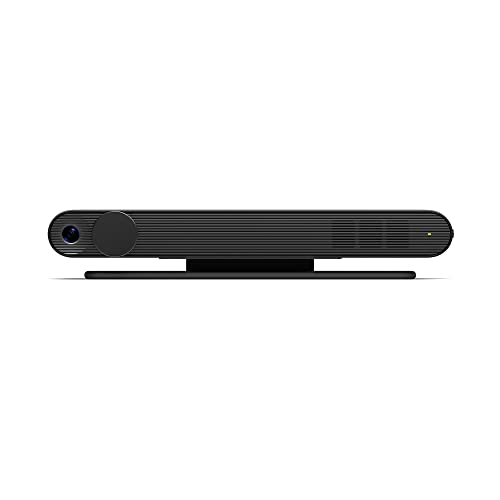
The Meta Portal TV is the closest thing here to a true "TV that video calls," turning your existing set into a whole-room calling screen from a 0.68 lb box.
Best for: families who want group calls on the living-room screen Skip it if: you need a general streaming device
What sets this apart in the group is focus. It exists to do one job, and the whole design points at it. At 0.68 lb and 1.29 x 7.49 x 2.26 in, it's the lightest calling hub here by a wide margin, less than half the weight of its own Alexa sibling. Facebook says the Smart Camera adjusts automatically so you can move around and stay in frame, and that Smart Sound keeps your voice clear over background noise. The listing describes it capturing the whole room so nobody jostles for position, which is the real reason to put a call on a TV instead of a phone.
It calls through Messenger and WhatsApp, so the person on the other end doesn't need a Portal of their own. There's a physical camera cover and a hardware switch to disable the camera and mic, per the maker. Every fact I could confirm is dated 2019, and the model carries a 1 year manufacturer warranty.
The trade-off against the rest of the set: it's tied to Meta's calling apps, and it does nothing else useful. No streaming, no remote control of the TV.
Pros:
- Lightest calling hub here at 0.68 lb
- Calls out to Messenger and WhatsApp users
- Whole-room camera framing claim for group calls
- Physical camera cover plus hardware mic switch
- Backed by a 1 year manufacturer warranty
Cons:
- Locked to Meta's calling ecosystem
- Does nothing beyond video calls
- Released in 2019, so it's a mature design
- Single seller lists it
2. Caavo JubileeTV Remote Care System for Seniors — Best premium
JubileeTV is the pick when the person you're calling can't reliably answer, because you drive their TV from your own phone.

Best for: adult children checking in on an older parent Skip it if: everyone in the house is tech-comfortable
This is the most expensive pick here, and it earns the position by solving a problem none of the others touch. Caavo says you can video call your loved one's TV directly with auto-answer, so they never have to find a remote or accept a call. You can also turn the TV on or off, change channels, adjust volume and troubleshoot from your phone, per the listing. That remote-control angle is unique in this group.
It goes further than calling. The maker describes a drop-in mode with one-way video and audio for a quick check that all is well, alerts for when someone enters or leaves the room, and the ability to push medication reminders, notes and photos straight to the screen. There's no app for the older person to learn.
Published specs are thin: black, 1.37 x 10.4 x 5.9 in, model Centro. No weight, no stated warranty. That's the honest weakness against the Portal TV, which publishes more and costs less. You're paying for the care features, not the spec sheet.
Pros:
- Auto-answer means the recipient does nothing
- Control their TV remotely from your phone
- Drop-in check-ins and room alerts claimed
- Sends reminders and photos to the screen
- No app for the older person to learn
Cons:
- The most expensive pick here
- No published weight or warranty
- Aimed narrowly at senior care
- Only one seller lists it
3. RayBit 4K Pro Audio and Video Conference Room Camera — Best for families
The RayBit is the strongest camera in the set, but it's built for a computer, not a TV, so read that carefully.

Best for: a shared home computer used for group meetings Skip it if: you want it to plug straight into a TV
Among these six, the RayBit has the most complete camera hardware and the longest warranty at 2 year. It weighs 0.99 lb and measures 1.18 x 2.36 x 4.72 in, the SeeUp 4C model. RayBit describes an all-in-one unit that merges a 4K camera, speakers, noise-cancelling microphones and a remote into one bar, aimed at Teams, Zoom and Skype.
The framing features are the draw for a busy household. The maker claims AI auto-framing across a 94° wide angle that adjusts to how many people are in the shot, plus presenter tracking that follows whoever is speaking. There's a 5X digital zoom and preset views you control from the included remote, per the listing. For a family that piles onto one call, that whole-group framing is genuinely useful.
Here's the catch, and it's the reason it isn't higher: its listing pairs it with desktop, PC, monitor and laptop, not a smart TV. If your "TV" is really a computer on a big screen, it fits. If it's a standalone television, it likely won't. That mismatch is its trade-off against the two calling hubs.
Pros:
- Longest warranty here at 2 year
- 4K camera, speaker and mic in one bar
- AI auto-framing across 94° claimed
- Presenter tracking and 5X digital zoom
- Included remote for zoom and presets
Cons:
- Built for a computer, not a TV
- Needs a host device to run the call
- Heaviest of the accessory picks at 0.99 lb
- Single seller lists it
4. Meta Quest Portal TV from Facebook — Most versatile
This is the standard Portal TV's UK-import cousin, with Alexa built in and AR call effects, if you can live with the extra bulk.

Best for: buyers who want Alexa and AR call effects too Skip it if: you can find the newer, lighter model instead
The pitch for this one is breadth. Beyond the same smart-camera calling as our winner, the maker lists Alexa built in, so you can ask for music, the news, the weather, timers and smart-home control. There's a Story Time mode that adds music, animation and AR effects to children's stories, plus AR masks on calls. For a house that wants a calling device that also does voice-assistant duty, that's the versatile choice.
The calling matches the top pick: Messenger and WhatsApp, with group calls of up to three on WhatsApp or seven on Messenger, per the listing. Smart Camera pans, zooms and widens automatically; Smart Sound lifts voices over noise.
Two things hold it back. It weighs 1.74 lb against the standard model's 0.68 lb, and it's a UK import from 2019, model 899-00081-13. It publishes no warranty here, unlike the standard Portal TV. If you want the plain calling experience, the lighter, warranty-backed version above is the smarter buy. This one is for the Alexa and AR extras specifically.
Pros:
- Alexa built in for voice control
- Story Time and AR call effects claimed
- Messenger group calls up to seven
- Same smart-camera framing as the winner
Cons:
- Heavy at 1.74 lb, more than double the standard model
- A UK import, so check compatibility
- No published warranty here
- Slower seller than the standard Portal TV
5. X88 Screencast TV Stick 4K Ultra HD Streaming Stick — Best upgrade
The X88 doesn't run a call itself, but it's a clean way to throw a phone-based video call onto a 4K screen.

Best for: casting a phone's video app to the big screen Skip it if: you want the TV itself to run the camera
Think of this as the "I already have a good camera in my pocket" pick. The X88 is a 16GB streaming stick that plugs into an HDMI port and mirrors your phone, tablet or laptop to the TV. The maker lists Chromecast, Miracast and AirPlay support, so it works across iPhone from iOS 9.0 up, iPad, and most Android and Windows devices. It's the second-cheapest of the six.
For calls, the play is simple: start the call on your phone, mirror it, and the far end shows up on the big screen while your phone stays the camera and mic. RayBit-style whole-room framing isn't here, and neither is a dedicated camera. That's the fundamental limit of every mirroring device.
The listing quotes 4K@30Hz, 1080P@60Hz and 720p support. Its odd published dimension, 0.51 x 31 x 1.18 in, looks like a data-entry slip in the stick's length, so treat the physical size as unconfirmed. Against the calling hubs, it's cheaper and more flexible, but it makes your phone do the actual work. Two sellers list it.
Pros:
- Second-cheapest pick in the set
- 16GB stick with AirPlay, Miracast, Chromecast
- Works from iPhone, Android and Windows
- Uses your phone's existing camera
Cons:
- Can't run a call on its own
- No dedicated camera or room framing
- Published dimensions look unreliable
- Setup depends on stable Wi-Fi
6. Tsemy Wireless Screen Mirroring Adapter — Best budget pick
The Tsemy is the cheapest way to get a call from your phone onto a TV, as long as your phone is on the supported list.

Best for: the cheapest way to mirror a call onto a TV Skip it if: you own a Google Pixel or Motorola phone
This is the entry point of the whole group and the cheapest of the six. At 1.16 oz and 1 x 3 x 1 in, it's also the smallest and lightest thing here, the ANYCAST-01 model. Tsemy describes a three-step setup, plug, connect, mirror, with no app or driver download, casting to a TV, projector or monitor.
Like the X88, it carries a phone's call rather than running its own. The maker lists AirPlay, Miracast and DLNA, with two modes: AirPlay for iOS and Miracast for Android and Windows. Compatibility runs to MacBook, iOS 9.0+, Android 5.0+ and Windows 10+.
Read the fine print, because the listing is refreshingly honest about it: not compatible with Google Pixel or Motorola phones. If that's your handset, stop here. The device also claims 4K support but guarantees only 1080p Full HD, so set expectations at 1080p. Against the X88, it's cheaper and lighter but has no onboard storage and a narrower support story. For a one-off video call on a TV without spending much, it does the job.
Pros:
- Cheapest pick in the set
- Tiny and light at 1.16 oz
- No app or driver install claimed
- AirPlay, Miracast and DLNA support
Cons:
- Not compatible with Pixel or Motorola phones
- 1080p guaranteed, not true 4K
- No onboard storage
- Only one seller lists it
Which pick fits your living room?
The right answer flips hard on who's calling and who's answering. Use these thresholds.
- You want the TV to do everything itself, for a group. Buy the Meta Portal TV. It's self-contained at 0.68 lb, frames the whole room, and calls out to Messenger and WhatsApp.
- You're buying for a parent who struggles with tech. Buy the JubileeTV. Auto-answer and phone-based remote control are the whole point, and no other pick offers them.
- Your "TV" is really a computer on a big monitor. Buy the RayBit, with its 2 year warranty and AI framing.
- You already trust your phone's camera and just want it on the screen. Buy the X88 if you want a bit more capability, or the Tsemy if price is everything and your phone isn't a Pixel or Motorola.
One more flip: if you specifically want Alexa and AR effects and can confirm the UK import works for you, the Alexa Portal TV covers that at 1.74 lb. Otherwise the standard model does the calling for less weight and a stated warranty.
What the listings do not tell you
A few gaps are worth flagging before you commit, because the product pages leave them open.
- Ongoing app support. The Portal TVs date to 2019. The listings don't state how long Meta's calling apps will keep working, and that's a real question for any calling device tied to one company's software.
- HDMI and Wi-Fi requirements. The dongles need a free HDMI port and, in practice, a solid home network to keep a call smooth. Neither listing specifies a minimum internet speed.
- Who can call whom. The Portal calls through Messenger and WhatsApp, so the far end needs one of those. The JubileeTV's calling is aimed at family, not open calling to anyone.
- Audio into your existing TV. None of the mirroring picks promises to handle the microphone side well, since your phone stays the mic.
When a spec is missing, I've written around it rather than guess. The JubileeTV's blank weight and warranty fields are the clearest example: I can tell you what it does, not what it weighs.
Setup: what owning one actually involves
Owning a calling device is not the same as owning a TV, so here's the shape of it.
- Confirm the connection. Every pick here needs an HDMI port. The dongles plug straight in; the hubs sit alongside your set. Check you have a free port first.
- Connect to Wi-Fi. Calls and mirroring both lean on your home network. A weak signal near the TV is the most common reason a call stutters.
- Pick the calling app or mode. The Portal TV wants Messenger or WhatsApp accounts. The dongles want AirPlay for iOS or Miracast for Android and Windows.
- Set privacy how you like it. The Meta Portal TV has a camera cover and a hardware mic switch, per the maker. Decide up front whether the camera stays covered between calls.
The JubileeTV is the outlier: much of its setup happens on the caregiver's phone, not the older person's TV, which is exactly why it suits families who live apart.
The verdict
If you want the single best TV for video calls and everyone in your house can tap an answer button, buy the Meta Portal TV. It's the most self-contained pick here, it's the lightest calling hub at 0.68 lb, it frames the whole room, and it dials out to Messenger and WhatsApp so your relatives don't need matching hardware. The cutoff is who answers the call.
If the person on the other end can't reliably answer, the calculation flips to the Caavo JubileeTV. Its exact advantage over the Portal is remote control: auto-answer plus the ability to turn the TV on, change channels and drop in for a check, all from your phone across town. That's worth its premium price if you're caring for a parent from a distance, and it's pointless if you're not.
Everything else is a supporting act. The RayBit is the camera to buy when the screen is a computer. The Alexa Portal TV adds voice control at 1.74 lb. The X88 and Tsemy dongles are the cheap route when your phone already carries the call. Match the pick to who's answering, and none of the six will disappoint.
FAQ
Is a dedicated device really the best TV for video calls?
A dedicated device is the best TV for video calls in practice, because no ordinary television has a built-in camera and calling app. The Meta Portal TV supplies both from a 0.68 lb box that uses your existing screen. The alternative is a mirroring dongle that displays a call running on your phone, which works but keeps your phone doing the real job.
Is the JubileeTV worth the premium over the Portal TV?
The JubileeTV is worth the premium only for a specific buyer: someone caring for an older relative from a distance. It's the most expensive pick here, and it justifies that with auto-answer and remote TV control from your phone, per Caavo. If everyone in the home can tap a button to answer, the cheaper Portal TV does the calling just as well.
What device compatibility do the mirroring dongles need?
Device compatibility is the make-or-break spec for the dongles. The Tsemy lists AirPlay for iOS 9.0+, Miracast for Android 5.0+ and Windows 10+, but its listing states it won't work with Google Pixel or Motorola phones. The X88 lists iPhone from iOS 9.0, iPad, plus Android and Windows. Check your exact handset against those lists before buying either.
Portal TV versus the Alexa Portal TV: which should I pick?
Portal TV versus the Alexa version comes down to weight and extras. The standard Meta Portal TV is 0.68 lb, carries a 1 year warranty, and does the core calling. The Alexa import weighs 1.74 lb, publishes no warranty here, and adds voice control plus AR effects. Choose the Alexa model only if you specifically want those extras and can confirm the import works.
What's the biggest mistake buying a TV for video calls?
The biggest mistake is buying a mirroring dongle expecting it to have its own camera. The X88 and Tsemy only display a call your phone is running, so there's no whole-room framing and no built-in mic on the TV side. If you want the television to run the call itself, buy a calling hub like the Meta Portal TV instead.
Start by answering one question: who taps the button when the call comes in? If it's you or another capable adult, the Meta Portal TV is the clean default, self-contained, light at 0.68 lb, and built to put a group of faces on your living-room screen without anyone crowding the lens. If it's a parent who'd rather not fuss with a remote, spend up for the JubileeTV and let auto-answer handle it. Confirm your HDMI port and Wi-Fi first, match the pick to who's answering, and the rest is just saying hello.